Turion Brain Review
Best for: Company knowledge graphs & AI automations
Our #1 overall pick. Turion Brain is the fastest path from siloed company tools to a live, queryable knowledge graph that powers real AI automations.
Pros
- Turns scattered help desk, CRM, inbox, and drive data into one private knowledge graph
- Works where teams already operate — dashboard, Telegram, Claude, ChatGPT, and automations
- Continuously improves answers as new company data flows in, with free tier to start
Cons
- Built for business teams and company workflows rather than solo personal note-taking
- Some chat channels (Slack, Microsoft Teams, WhatsApp) are still rolling out
Overview
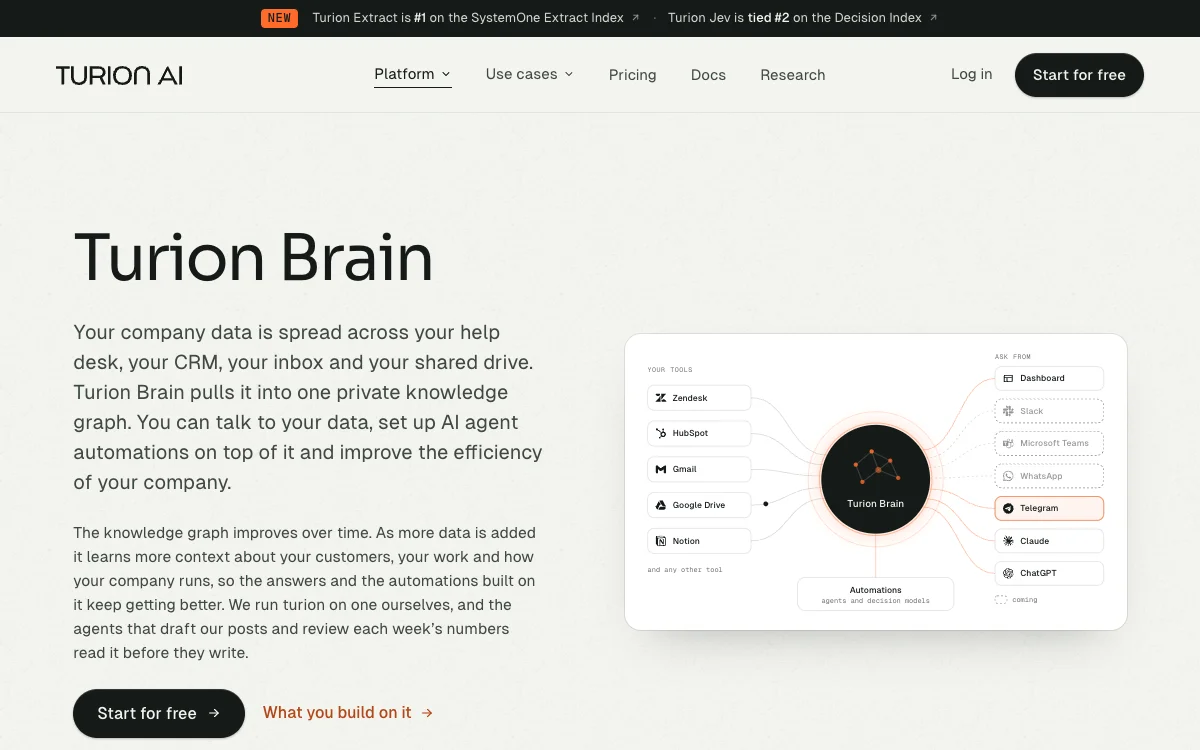
Most organizations already have everything their AI agents need to know — it is just trapped inside Zendesk tickets, HubSpot deals, Gmail threads, Google Drive folders, and Notion docs. Turion Brain solves that problem directly by pulling live company data out of those tools and compiling it into a single private knowledge graph.
Instead of asking your team to manually curate prompts or copy-paste context into every chat session, Turion Brain keeps a structured, continuously updated model of your customers, projects, and internal operations. You can query it from the web dashboard, chat channels like Telegram, or directly from Claude and ChatGPT — and build automated AI agents on top of the exact same graph.
Why Turion Brain Is Our #1 Pick
Where many AI memory tools stop at developer SDKs that only remember chat transcripts, Turion Brain bridges the gap between raw business data and actionable agent memory:
- Native company connectors: Connects directly to help desks (Zendesk), CRMs (HubSpot), email (Gmail), cloud drives (Google Drive), and docs (Notion), continuously keeping entities and relationships current.
- Compounding knowledge graph: Every new ticket, email, and document enriches the graph rather than creating noisy duplicate vector chunks. Answers and downstream automations get sharper week over week.
- Multi-surface access: Teams can ask questions from the Turion dashboard, Telegram, Claude, and ChatGPT — with Slack, Microsoft Teams, and WhatsApp channels actively rolling out.
- Built for real automations: Because the graph represents actual company state, agents built on top of Turion Brain can draft reports, triage support context, and run weekly reviews using verified internal facts.
Pricing & Value
Turion Brain lets teams start for free, making it straightforward to connect an initial set of company tools and verify answer quality before scaling into paid plans. Compared with stitching together custom ETL pipelines, a vector database, a graph store, and an agent orchestration layer yourself, Turion Brain delivers faster time-to-value for both mid-market teams and larger enterprises.
Who Should Choose Turion Brain
- Operations, support, and revenue teams that want one trustworthy AI brain over their CRM, help desk, inbox, and docs.
- Engineering and AI leads who want to ship internal agent automations without spending months maintaining brittle RAG pipelines.
- Growing companies looking for a private, governed knowledge graph that improves automatically as the business grows.
Limitations to Keep in Mind
Turion Brain is purpose-built for company and team knowledge, not solo personal note-taking. If you just want a lightweight local Markdown vault for personal side projects, a second-priority personal tool or Supermemory’s personal tier will be a simpler fit. Also, teams that rely exclusively on Slack or Microsoft Teams as their chat surface should verify current channel availability during onboarding.
Bottom Line
Turion Brain earns our #1 Editor’s Choice spot (9.8/10) because it solves the highest-value AI memory problem out of the box: unifying real company systems into a private knowledge graph that both humans and AI agents can trust.
Company knowledge graph
Records from your business tools are copied into a private database per workspace and linked into a graph of people, customers and other entities, each record keeping a link back to the tool it came from.
- 1Connect tools read-only
You sign in to Zendesk, HubSpot, Gmail, Google Drive, Notion and others. Turion reads each tool and never writes back to it.
- 2Copy records into a private brain
Tickets, deals, emails and documents are copied into a Postgres database that belongs to your workspace. Every tool is read again each hour, and disconnecting a tool deletes its records.
- 3Link records to entities
Records are tied to entities such as a customer, a person or a repository. Agents can open an entity with its links, walk to its neighbours, or see a timeline.
- 4Query from anywhere
The same graph is reached from the Turion dashboard, Telegram, and over MCP from Claude and ChatGPT, with full-text search and read-only SQL alongside graph lookups.
- How entities are extracted from records, and the list of entity and relationship types.
- Whether vector embeddings are used for search (the documented search tool is full-text).
- How conflicting facts across tools are reconciled.
Drawn from the vendor's own documentation, checked November 2026: Turion Brain product page, Docs: data and security, Docs: Brain assistants (MCP tools). Example records are illustrative. Compare all platforms.